Outdoor Telecom Access Cabinet Solution
← Back to Solutions Telecom & Network

Outdoor Telecom Access Cabinet Solution

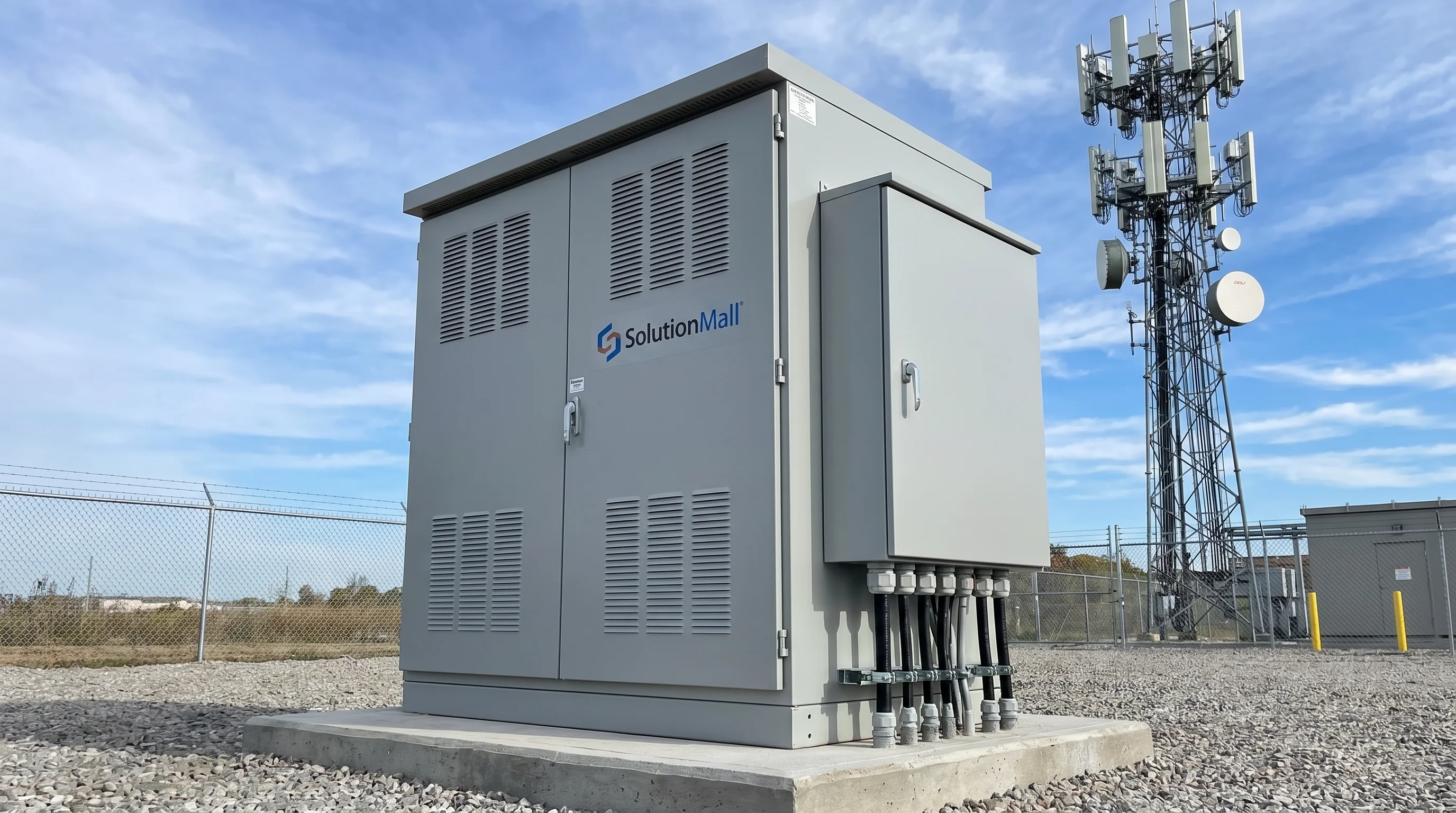
Standardized outdoor telecom access cabinet for campus network nodes, 5G edge sites, and field communication hubs — integrating ODF, managed switching, power distribution, and surge protection in a weatherproof enclosure.

ODF Fiber IP55 Industrial Switch 5G Edge

Solution Overview

The Outdoor Telecom Access Cabinet Solution addresses the critical need for standardized, weatherproof communication nodes at the network edge. As networks expand beyond data centers and equipment rooms into outdoor environments — campus grounds, road infrastructure, industrial sites, and 5G edge locations — the quality of the outdoor access cabinet determines the reliability of the entire network segment.

This solution integrates optical distribution frames (ODF), industrial managed switches, DC power supplies, PDUs, surge protection devices, and cable management accessories within a robust outdoor cabinet. The result is a field communication node that provides the same level of organization, protection, and maintainability as an indoor equipment room — in any outdoor environment.

Whether serving as a campus network distribution node, a 5G edge computing site, or a fiber access point for a residential complex, this solution creates a standardized, scalable communication infrastructure that supports current requirements and future network evolution.

Core Value Propositions

Fiber & Copper Integration
ODF and patch panel in a single cabinet provide complete fiber termination and copper Ethernet management at the network edge.
Industrial-Grade Switching
Managed industrial switches with VLAN, QoS, and ring topology support provide carrier-grade network performance in outdoor environments.
Comprehensive Power Management
DC power supply, PDU, and UPS-ready architecture ensure continuous network operation during power fluctuations and outages.
Multi-Layer Surge Protection
Power SPD, Ethernet SPD, and fiber protection ensure all communication paths are protected from lightning and surge damage.
Thermal Management
Fan-assisted ventilation or heat exchanger maintains safe operating temperature for active equipment in high-ambient-temperature outdoor locations.
Scalable Node Design
Standard 19-inch rack mounting inside the cabinet accommodates additional switches, routers, and edge computing units as network requirements grow.

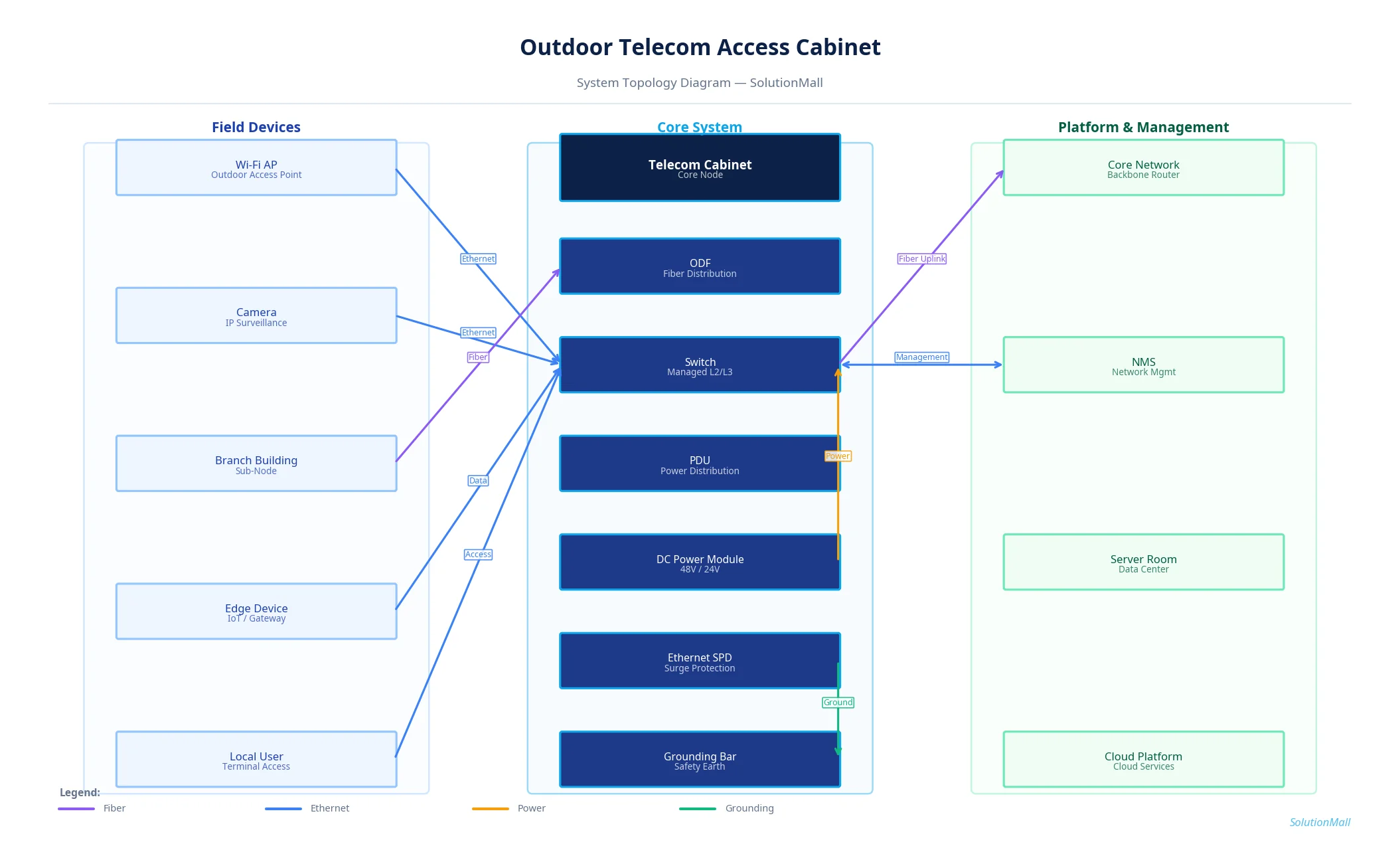
System Architecture Diagram

Outdoor Telecom Access Cabinet Solution System Topology Diagram

Outdoor Telecom Access Cabinet Solution — System Topology Diagram by SolutionMall

Technical Specifications

Cabinet TypeOutdoor telecom access cabinet
Protection RatingIP55 / IP65
Material1.5mm cold-rolled steel, powder-coated
Dimensions600×600×1800mm to 800×800×2000mm
Rack Space12U to 24U, 19-inch standard
Power InputAC220V with DC48V conversion
Fiber Capacity24 to 96 fiber ports (ODF)
Switch Ports24 to 48 Ethernet + 4 SFP uplinks
CoolingThermostat-controlled fan or heat exchanger
Operating Temp-40°C to +65°C

System Modules

ODF / Fiber Management Module
Optical distribution frame with splice trays, adapter panels, and fiber organizers for clean fiber termination and patch cord management.
Industrial Managed Switch
Layer 2/3 managed switch with VLAN, QoS, RSTP ring topology, and SNMP management for reliable network switching at the field node.
DC Power Supply & PDU
48VDC rectifier system with PDU for powering switches, ONU, and other active equipment, with individual circuit protection.
Power & Ethernet SPD
Type 2 power SPD and Cat6 Ethernet SPD protect all active equipment from lightning-induced surges on power and data lines.
Cable Organizer
Horizontal and vertical cable management panels maintain organized fiber and copper cable routing within the cabinet.
Thermal Management Unit
Thermostat-controlled fans or heat exchanger maintain cabinet internal temperature below equipment operating limits.

System Workflow

1

Fiber Cable Entry & Termination

Incoming fiber cables enter the cabinet through bottom cable glands and are secured with cable clamps. Fiber cores are fusion-spliced to pigtails and routed through the ODF splice tray to the adapter panel.

2

Copper Cable Termination

Ethernet cables from field devices connect to the patch panel or directly to switch ports. All connections are labeled with circuit IDs for maintenance reference.

3

Network Switching & Aggregation

The managed industrial switch aggregates all field device connections and provides uplink connectivity to the core network via fiber SFP ports. VLAN configuration separates different traffic types.

4

Power Distribution

AC power enters through the main breaker and SPD, then is converted to DC48V by the rectifier for active equipment. Individual PDU circuits protect each device.

5

Uplink to Core Network

Aggregated network traffic is transmitted via fiber uplink to the campus core switch, data center, or cloud platform. Redundant uplink ports support failover configurations.

6

Remote Management

The managed switch provides SNMP-based remote monitoring of port status, traffic statistics, and equipment health. Alerts are sent to the NMS when faults are detected.

Application Scenarios

▶ Campus Outdoor Network Node
Deploy at campus road intersections and building clusters to extend the campus network to outdoor areas while maintaining centralized management.
▶ 5G Edge Computing Site
Provide the physical infrastructure for 5G small cell base stations and edge computing units at roadside and campus locations.
▶ Building Exterior Access Point
Serve as the outdoor network access point for building clusters, connecting indoor structured cabling to the campus backbone network.
▶ Industrial Site Network Extension
Extend factory network to outdoor production areas, storage yards, and perimeter locations with industrial-grade weatherproof cabinets.
▶ Smart Campus Network Distribution
Distribute network connectivity to outdoor Wi-Fi APs, smart lighting controllers, environmental sensors, and access control systems.
▶ Roadside Communication Hub
Provide fiber and Ethernet connectivity for traffic management systems, surveillance cameras, and smart city IoT devices at roadside locations.

Selection Guide

✓ Select cabinet size and switch port count based on current device count plus 30% expansion capacity.
✓ For high-fiber-density installations, prioritize ODF capacity and fiber organizer space over switch port count.
✓ High-temperature outdoor locations (>40°C ambient) require heat exchanger or air conditioner — fan cooling alone is insufficient.
✓ Multi-lightning-strike areas require both power SPD (Type 1+2) and Ethernet SPD on all external-facing ports.
✓ If wireless gateways or edge computing units are included, add 50% to power budget for thermal and power headroom.
✓ Long-term expandable networks should use standard 19-inch rack mounting inside the cabinet for maximum equipment compatibility.

Deployment & Implementation Notes

⚠ Fiber cable bending radius must comply with manufacturer specifications — minimum 30mm for standard single-mode fiber.
⚠ Communication equipment and power modules should not be stacked randomly — maintain organized rack mounting with proper airflow.
⚠ Confirm ground foundation, installation orientation, and cable entry direction before cabinet installation.
⚠ Complete link testing, optical power measurement, and grounding resistance testing after equipment installation.
⚠ Outdoor cabinets must be sealed against condensation and rain ingress — verify door gaskets and cable gland sealing after installation.
⚠ Establish a port-to-device-to-uplink mapping document for each cabinet to support future maintenance and troubleshooting.

Key Products Required

Outdoor Telecom Cabinet ODF / Fiber Patch Module Industrial / Commercial Switch PDU DC Power Supply Power SPD / Ethernet SPD Cable Organizer Fan / Heat Exchanger Grounding Bar Rack Mount Accessories

Why Choose SolutionMall

🏭

Engineering-Grade Quality

All enclosures and components meet IEC, ATEX, UL, and local standards. Rigorous quality control from material sourcing to final delivery ensures consistent performance across every project.

Fast & Reliable Delivery

Standard products ship within 3–7 business days. Custom solutions with 2–4 week lead time for most configurations. Global logistics network supports projects in 60+ countries.

🔧

Dedicated Technical Support

Experienced engineering team provides product selection guidance, system design review, BOM optimization, and on-site installation support for complex projects.

🌍

Global Supply Chain

Sourcing from 200+ qualified manufacturers across Asia, Europe, and North America. Competitive pricing with consistent quality and full traceability for every order.